

Quickstart
From your first API key to your first API call, all within seconds.
Making your first API call is easy—all you need is a Deploy API key and a model ID.
Create your API key
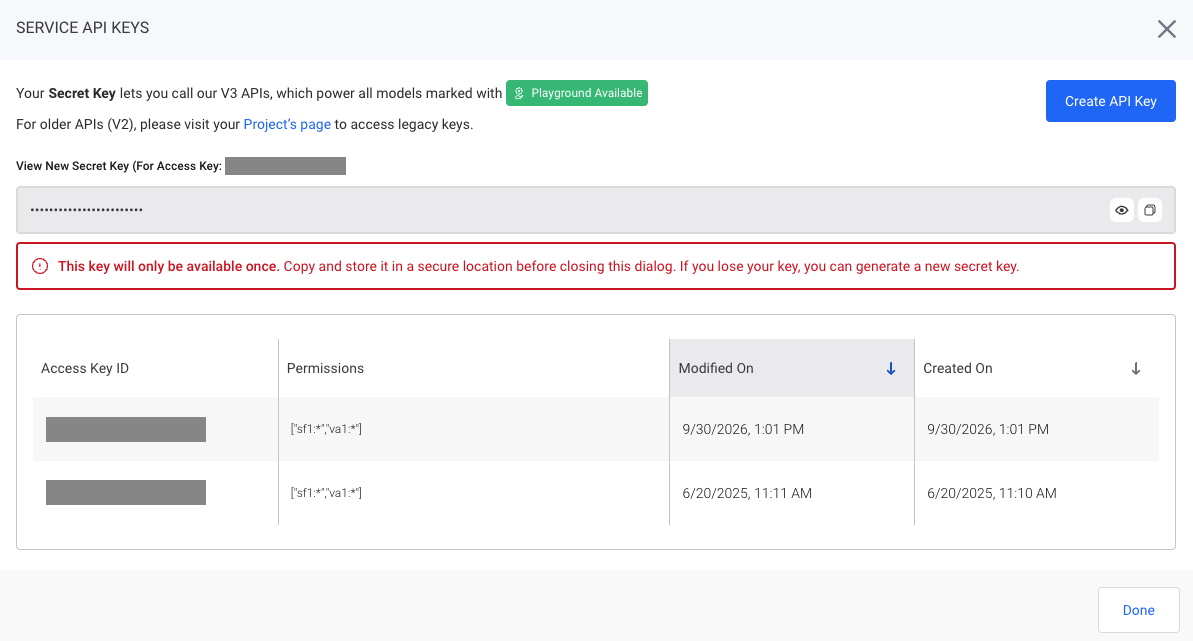
Log in to Deploy and navigate to Service API Keys in the sidebar.
Click Create API Key to create a new Secret Key scoped to your organization. This key can be used with any Playground Available model.
This Secret Key will only be visible upon generation. Copy and store it in a secure location. If you lose your Secret Key, you can generate a new one.
need to replace this screenshot as it references V3/V2
Install the OpenAI SDK
If you're using Python, install the OpenAI Python SDK to make API requests to Deploy:
pip install openaiDeploy supports the OpenAI-compatible API format, so you can use the OpenAI SDK with your Deploy API key and endpoint without needing a separate SDK.
Make your first API call
Below is an example of a sample request. Replace the api_key callout with your Secret Key.
You'll need to provide the model ID of your choice in model as well as a base_url, which is region-dependent (if you are a customer in SF or VA).
- Closest: https://api.deploy.com/api/v1
- SF: https://api-sf1.deploy.com/api/v1
- VA: https://api-va1.deploy.com/api/v1
If you're accessing from outside the US, you may have lower latency with:
- Closest: https://api-cdn.deploy.com/api/v1
- SF: https://api-sf1-cdn.deploy.com/api/v1
- VA: https://api-va1-cdn.deploy.com/api/v1
The example below uses the model deepseek-ai/deepseek-v4.1-flash .
from openai import OpenAI

client = OpenAI(
    base_url="https://api.deploy.com/api/v1",
    api_key="DEPLOY_API_KEY",
)
response = client.chat.completions.create(
    model="deepseek-ai/deepseek-v4.1-flash",
    messages=[{"role": "user", "content": "Explain TCP and UDP in two sentences."}],
)

print(response.choices[0].message.content)
curl https://api.deploy.com/api/v1/chat/completions \
-H "Authorization: Bearer $DEPLOY_API_KEY" \
-H "Content-Type: application/json" \
-d '{
"model": "deepseek-ai/deepseek-v4.1-flash",
"messages": [{"role": "user", "content": "Hello!"}]
}'Your response will be similar to the following example:
{
  "id": "bf7eb425-c8ee-11f1-bc46-67542ee84316",
  "object": "chat.completion",
  "created": 1792106317,
  "model": "deepseek-ai/deepseek-v4.1-flash",
  "choices": [
    {
      "index": 0,
      "message": {
        "role": "assistant",
        "content": "Hello! How can I help you today?",
        "reasoning_content": "The user just said \"Hello!\" That's a simple greeting. I should respond warmly and openly, inviting them to share what they need. No need for tools or complex analysis here—just a friendly, natural reply that sets a helpful tone. I'll keep it simple and engaging."
      },
      "finish_reason": "stop",
      "logprobs": null
    }
  ],
  "usage": {
    "prompt_tokens": 32,
    "completion_tokens": 68,
    "total_tokens": 100,
    "prompt_tokens_details": { "cached_tokens": 0 },
    "completion_tokens_details": { "reasoning_tokens": 58 }
  }
}
And that's it—you've made your first API call.
Submit images and videos
You can send visual inputs to models that support image or video understanding. You can provide media using a URL or a Base64-encoded data URI. The media is included in the message content alongside your text prompt.
Supported media types and formats vary per model—check the Input Modality column in Available Models.
Image
import os
from openai import OpenAI

client = OpenAI(
    base_url="https://api.deploy.com/api/v1",
    api_key="DEPLOY_API_KEY",
)

response = client.chat.completions.create(
    model="deepseek-ai/deepseek-v4.1-flash",
    messages=[
        {
            "role": "user",
            "content": [
                {
                    "type": "text",
                    "text": "Describe this image.",
                },
                {
                    "type": "image_url",
                    "image_url": {
                        "url": "https://example.com/image.jpg",
                    },
                },
            ],
        }
    ],
)

print(response.choices[0].message.content)
Video
import os
from openai import OpenAI

client = OpenAI(
    base_url="https://api.deploy.com/api/v1",
    api_key="DEPLOY_API_KEY",
)

response = client.chat.completions.create(
    model="zai-org/glm-5.3-flash",
    messages=[
        {
            "role": "user",
            "content": [
                {
                    "type": "text",
                    "text": "Summarize what happens in this video.",
                },
                {
                    "type": "video_url",
                    "video_url": {
                        "url": "https://example.com/video.mp4",
                    },
                },
            ],
        }
    ],
)

print(response.choices[0].message.content)
Base64
Useful when the media is stored locally or when you don't want to provide an externally hosted URL.
import os
from openai import OpenAI
import base64
import mimetypes

client = OpenAI(
    api_key="DEPLOY_API_KEY",
    base_url="https://api.deploy.com/api/v1",
)

image_path = "image.jpg"

mime_type, _ = mimetypes.guess_type(image_path)
if mime_type is None:
    mime_type = "image/jpeg"

with open(image_path, "rb") as image_file:
    encoded_image = base64.b64encode(image_file.read()).decode("utf-8")

data_url = f"data:{mime_type};base64,{encoded_image}"

response = client.chat.completions.create(
    model="deepseek-ai/deepseek-v4.1-flash",
    messages=[
        {
            "role": "user",
            "content": [
                {
                    "type": "text",
                    "text": "Describe this image.",
                },
                {
                    "type": "image_url",
                    "image_url": {"url": data_url},
                },
            ],
        }
    ],
)

print(response.choices[0].message.content)
Updated 7 days ago